

Introduction
A lot of people buy a solar generator and assume they’re pretty much set after that. Keep the battery charged, set up the solar panels when needed, and the system should be ready whenever the power goes out. Most people don’t think much about maintenance because solar generators are much simpler than gas generators.
But a solar generator can slowly lose performance without making it obvious. Maybe it takes a little longer to recharge than it used to or the battery doesn’t last quite as long during an outage. Maybe the cooling fan seems to run more often than before. None of those things feel like a major problem at first, so they’re easy to ignore.
The problem is that small issues don’t stay small forever.
By the time you notice something is wrong, the generator may already be charging more slowly or not running as long as it used to. Dust on the panels can reduce charging efficiency. Storing the unit in a hot garage can put extra stress on the battery. Blocked vents can cause heat to build up inside the system. Even a loose connection or worn cable can affect how efficiently power moves through the system. Over time, these issues can lead to slower charging, shorter runtimes, and reduced overall performance.
Most people don’t notice a problem until they need the generator during a power outage. That’s when slower charging or shorter battery runtime becomes hard to ignore.
The good news is that preventing these issues usually doesn’t require much effort. A few simple maintenance checks can help the battery last longer, improve charging performance, and keep the system ready for outages and emergencies.
In this guide, we’ll look at the parts of a solar generator that need attention and some simple checks that can help avoid problems later.
“A few moments of maintenance can add years of performance“
Why Solar Generator Maintenance Is Important
Scenario: Imagine a summer storm knocks out power in your neighbourhood. You bring out your solar generator expecting it to keep a refrigerator, Wi-Fi router, a few lights, and your phones running for several hours. The last time you used it, everything worked perfectly, so you don’t think twice about it.
A few hours later, the battery is draining faster than expected. When the weather clears, recharging the system takes longer than it used to. At first, it may seem like the battery is wearing out. But in many cases, the cause is something much simpler.
In many situations, performance issues are caused by small maintenance problems that have built up over time. Maybe the solar panels have collected a layer of dust and pollen. Maybe the generator spent months sitting in a hot garage. Perhaps the cooling vents are partially blocked, restricting airflow inside the unit. None of these issues seem serious on their own, but together they can affect how efficiently the system charges, stores, and delivers power.
Solar panels are a good example. A buildup of dust, dirt, pollen, or bird droppings can reduce the amount of sunlight reaching the solar cells. Depending on local conditions, dirty panels can lose anywhere from 5% to 25% of their power output. Less power generation means longer charging times and less energy available for backup use.
Battery care plays an equally important role. Most lithium batteries perform best between 59°F and 95°F (15°C and 35°C). When a solar generator is regularly exposed to temperatures above that range, especially in garages, sheds, or vehicles during the summer, battery capacity can gradually decline. The generator may still function normally, but it may not provide the same runtime it once did.
Airflow is another factor that often gets overlooked. Cooling vents are designed to help regulate internal temperatures while the generator is charging or powering devices. When dust and debris block these vents, heat can build up inside the unit. Excess heat places additional stress on batteries and electronic components, which can affect both performance and long-term reliability.
Quick Facts related to Solar generator Maintenance
| Maintenance Area | Potential Impact |
| Dirty Solar Panels | Can reduce power output by 5%-25% |
| High Battery Temperatures | May reduce battery life over time |
| Blocked Cooling Vents | Can increase internal temperatures |
| Damaged Cables or Connectors | May reduce charging performance |
Real scenario:
In Florida, many homeowners keep solar generator for hurricane season. So, even when its not in use, it’s a good practice to recharge the battery every 3-6 months, update firmware before storm season, and test the unit to keep it emergency ready.
Components That Require Regular Maintenance
Most solar generators don’t need a lot of maintenance, but there are a few parts that are worth checking once in a while.
Battery
The battery is probably the biggest one. It’s also usually the most expensive part of the system. A lot of newer solar generators use LiFePO4 batteries rated for 3,000 to 6,000 cycles, but things like heat and storage conditions can still affect how they age over time.
Solar Panels
Solar panels are another thing people don’t always think about. A panel can look fine and still lose some output. Pollen, bird droppings, or even shade from a nearby branch can get in the way. In some cases, output can drop by 5% to 25%. Usually, the first sign is that charging starts taking longer.
Vents
The vents are easy to forget about because most people never look at them. But if dust starts building up around those areas, heat can get trapped inside the unit. You might notice the fan running more often than it used to.
Connections
Cables and connectors are worth a quick check too. Sometimes a connection becomes loose without you realizing it. The generator still works, so the problem often goes unnoticed until charging slows down or power cuts out for a second.
| Component | Common Issue | Why It Matters |
| Battery | Stored at 100% charge for long periods | Can contribute to faster capacity loss over time |
| Solar Panels | Pollen, bird droppings, or partial shading | Power output can drop by 5%–25% |
| Vents | Dust restricting airflow | Higher internal temperatures can shorten component lifespan |
| Cables & Connectors | Loose or worn connections | Can slow charging or cause intermittent power flow |
Battery Maintenance and Storage Best Practices
The battery is what makes a solar generator useful during an outage. It stores the energy collected by the solar panels and powers your devices when the grid goes down. Because of that, the way the battery is stored and used can make a big difference in how long it lasts.
One mistake people often make is charging the generator to 100% and then leaving it in storage for months. The unit may still turn on when it’s needed, but that doesn’t always mean the battery is in great shape. For long-term storage, many manufacturers recommend keeping the battery somewhere around 40% to 60% charge instead of leaving it completely full or completely empty.
Temperature matters too. Most lithium batteries are between 59°F and 95°F (15°C and 35°C). If a generator spends months in a hot garage during the summer, the battery can age faster than expected. The same goes for places that get extremely cold during the winter.
Heat ages batteries faster than actual usage
(A solar generator stored at 95°F (35°C ) can loose battery capacity much faster than one stored at room temperature, even if its rarely used)
Another thing to watch for is running the battery all the way down to 0% every time it’s used. Doing that once in a while isn’t usually a problem, but making a habit of it can put extra stress on the battery over time. Many owners try to recharge the unit before it gets completely drained.
A quick battery check every month or two can help you spot changes in battery performance early. If the generator is being stored, it’s a good idea to check the charge level occasionally and recharge it if needed.
Battery Storage Checklist
| Task | Recommendation |
| Storage Charge Level | Keep between 40% and 60% |
| Operating Temperature | 59°F–95°F (15°C–35°C) |
| Storage Location | Cool, dry place away from direct heat |
| Charge Check | Every 1–2 months |
| Deep Discharge | Avoid running to 0% regularly |
Solar Panel Cleaning and Care
Dust, pollen, and bird droppings can block sunlight from reaching the solar cells, reducing panel efficiency by 5% to 25%. In some cases, dirt covering only a small section of a panel can create hot spots, where certain cells become hotter and produce less power.
A soft cloth and clean water are usually enough for cleaning. Avoid abrasive brushes or strong chemicals that may damage the panel surface. Since panel temperatures can reach 140°F to 160°F (60°C to 70°C) on sunny days, cleaning is safer when the panels are cooler.
While cleaning, look for cracks, loose cables, or anything creating partial shade. Catching these issues early can help prevent unnecessary power loss and keep the solar generator charging efficiently.
Maintaining the Inverter and Electronics
If a solar generator suddenly shuts down while powering appliances, overheating or an overload is often one of the first things to check. To keep it working properly, make sure the unit has enough airflow and is not covered by dust.
Heat is one of the biggest factors that can affect inverter performance. During heavy use, the inverter can generate a significant amount of heat. Most units are designed to work best within a range of 32°F and 104°F (0°C and 40°C), so keeping the vents clear can help prevent overheating. If the temperature stays above this range for long periods, conversion efficiency may decrease and the system may shut down to prevent damage.
It is also a good idea to check the display screen occasionally for warning lights or error messages. Catching a problem early can help prevent unnecessary strain on the inverter and other electronic components.
Port and Cable Inspection
Ports and cables may look like small parts of the system, but they play a big role in keeping everything running smoothly. Even a slightly loose connection can lead to power loss or charging issues over time.
It’s good to occasionally check MC4 connectors and make sure they are properly locked. Look at DC input and output ports for any dirt, rust, or signs of wear. AC sockets should also be checked for burn marks or heating signs. Cables should be in good condition with no cracks, cuts, or damaged insulation.
When connections are not tight, resistance in the system increases. This can cause voltage drop and unnecessary heat buildup, which may reduce overall efficiency by around 2% to 5%, depending on usage.
During an RV trip, one owner noticed that his solar generator was charging more slowly than usual. Everything looked normal, so he didn’t expect a connection problem. After checking the cables, he found that one of the MC4 connectors was slightly loose. Once it was locked properly, charging speed improved.
A quick inspection once in a while can help keep charging and power delivery working as expected.
Monthly Solar Generator Maintenance Checklist
A quick monthly check helps you spot performance issues early and keep your solar generator running efficiently.
| Component | What to Check | Technical Indicator |
| Solar Output | Compare monthly energy production | ±5–10% variation is normal under similar weather conditions |
| Battery | Charge and discharge behaviour | Stable cycling; no sudden voltage drops below rated level |
| Inverter | Display status and load behaviour | No repeated overload or thermal warning |
| Cables & Ports | Connection condition | Voltage drop should stay under 2–3% |
| System Performance | Overall efficiency | Optimal systems stay around 80–90% efficiency |
Small changes in these values are normal, but consistent deviation usually points to wear, shading, or electrical resistance issues.
Seasonal Solar Generator Maintenance Checklist
Solar generators don’t perform exactly the same in every season, and that’s normal. Weather changes affect how much energy the system can produce.
In summer, high temperatures can put extra stress on the system. When temperatures go above 95°F–110°F (35°C–43°C), the inverter may not run as smoothly as it does in cooler conditions. Keeping proper airflow around the unit helps it stay stable during hot days.
During rainy or wet conditions, rain may clean off dust, but it can still leave behind water spots or moisture on surfaces. If connectors stay exposed for long periods, moisture can slowly start affecting metal contact points.
In winter, the main change is reduced sunlight. Shorter days and weaker sunlight naturally lower energy production, even if the system is working properly.
Across all seasons, it’s normal to see around 10–20% variation in output depending on weather and sunlight conditions.
Real scenario:
A hometown in Phoenix, Arizona uses an Ecoflow Delta Pro as a home backup power source during summer outages. Since the garage temperatures can exceed 110°F (43°C), storing the generator there can significantly accelerate battery degradation. In such scenario, keeping the battery in cool, dry room and maintaining battery between 50-80% during storage helps in overall lifespan.
Extreme heat is common across states like Arizona, Texas, Nevada and parts of California, so maintenance matters a lot in these places.
Troubleshooting Common Problems
Most solar generator issues start small before they turn into bigger problems. A few quick checks usually help you understand what’s going on.
| Problem | Possible Cause | What to Check |
| Slow or no charging | Loose connection or weak input source | Check cables, connectors, and the power coming from the solar panel or charger |
| Reduced runtime | Heavy power use or battery wear | Compare the runtime to normal use. A drop of around 10–15% may indicate battery wear |
| Inverter shutdown | Overload or heat buildup | Check the total power load and make sure the unit has good airflow |
| Low solar output | Shade, dirt, or reduced panel performance | Check for dirt, shade, or anything blocking sunlight |
Most issues come from load imbalance, connection resistance, or environmental changes. If performance stays within normal ranges, it is usually not a fault. But if the same issue keeps repeating outside these limits, it’s worth checking the system more closely.
Signs Your Solar Generator Needs Service
Some problems can be fixed with basic maintenance, but others may need professional attention. If the same issue keeps coming back after checking the panels, cables, and battery, it may be a sign of a deeper problem. Unusual noises, error messages, a swollen battery, or charging problems that do not improve after troubleshooting are all good reasons to have the system inspected. Addressing these issues early can help prevent more serious damage.
20 Solar Generator Maintenance Tips by Solar experts
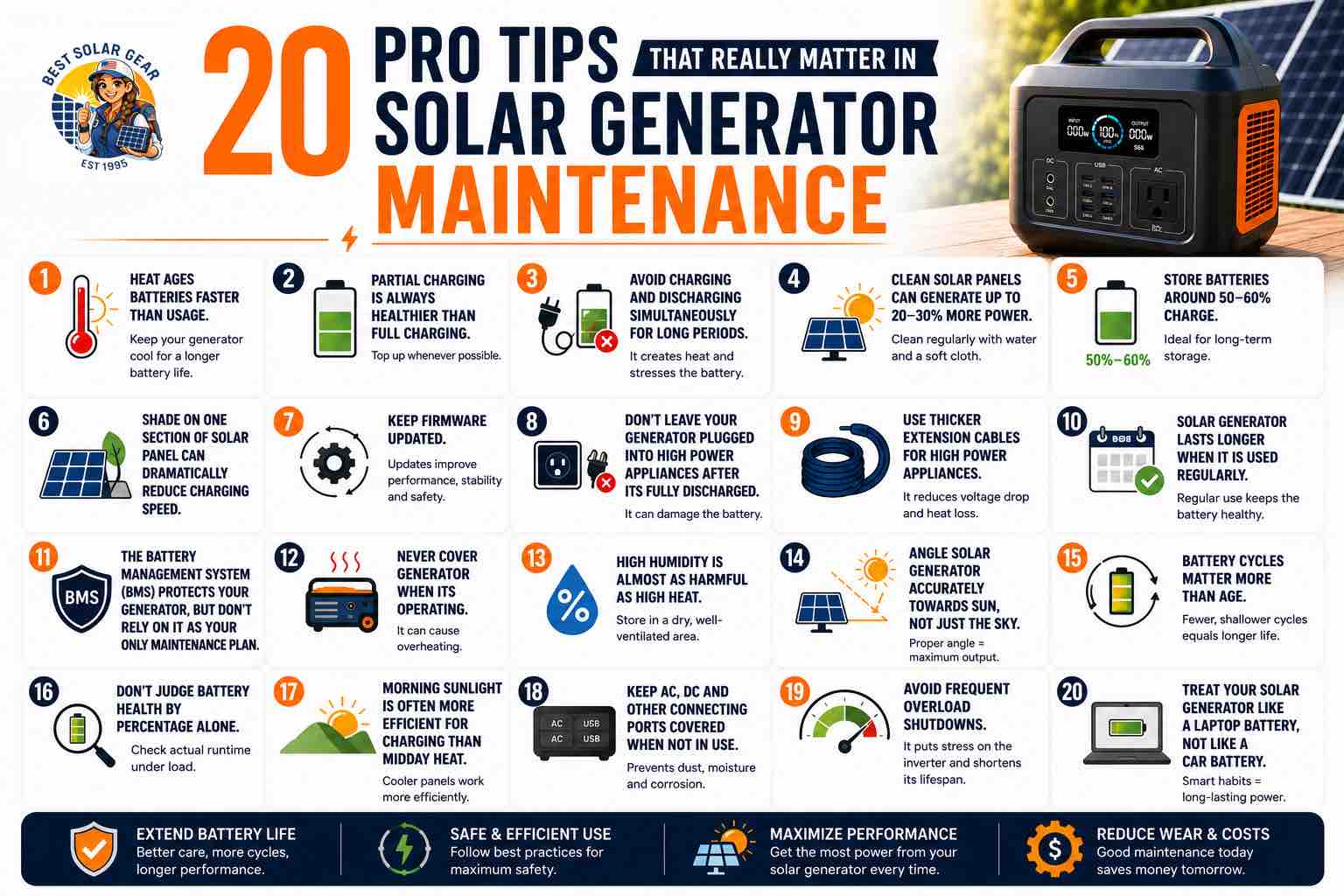
20 pro tips that really matter in solar generator maintenance:
- Heat ages batteries faster than usage
- Partial charging is always healthier than full charging
- Avoid charging and discharging simultaneously for long periods
- Clean solar panels can generate up to 20-30% more power
- Store batteries around 50-60% charge
- Shade on one section of solar panel can dramatically reduce charging speed
- Keep firmware updated
- Don’t leave your generator plugged into high power appliances after its fully discharged
- Use thicker extension cables for high power appliances
- Solar generator lasts longer when it is used regularily
- The battery management system (BMS) protects your generator, but don’t rely on it as your only maintenance plan.
- Never cover generator when its operating
- High humidity is almost as harmful as high heat
- Angle solar generator accurately towards sun, not just the sky
- Battery cycles matter more than age
- Don’t judge battery health by percentage alone
- Morning sunlight is often more efficient for charging than midday heat
- Keep AC, DC and other connecting ports covered when not in use
- Avoid frequent overload shutdowns
- Treat your solar generator like a laptop battery, not like a car battery
If solar generator maintenance is your priority, these 20 maintenance tips must be part and parcel of your daily routine.
Final Verdict
Taking care of a solar generator does not take much time. Cleaning the panels, checking the cables, and keeping an eye on the battery can help avoid many common issues. Most problems start small, so catching them early is often easier than dealing with a bigger repair later. A few minutes of attention now and then can help keep the system ready when you need it.
A solar generator usually lasts longer when it is used with care. Try not to run it at full power for long periods. Good airflow helps reduce heat buildup while the system is in use. It is also worth checking cables and connectors from time to time, since a loose connection can cause a 1–3% voltage drop and slower charging. These simple steps can help keep the system running smoothly for years.
Always remember, its always the small things that matter the most in long run




I liked this thorough guide with real life actionable items. Thanks buddy
Most welcome. Also check other blogs on best solar power stations
I have mailed you regarding solar generator selection, do reply sir, thanks in advance
I have replied to it. Do check it out